Analyzing a Malicious Email with Anomix
September 24, 2025 • Email Analysis

Deep dive into phishing email analysis using Anomix, including headers, domains, threat intelligence, and full incident report.
Analyzing a Malicious Email with Anomix
In this write-up, let’s analyze a malicious email using Anomix.
anomix is an advanced CLI-based phishing email analysis tool that uses machine learning to automate investigation by:
- Extracting artifacts (headers, URLs, attachments).
- Comparing them with a trained model.
- Enriching them with Threat Intelligence (TI) sources.
- Generating a risk score and incident report.
This tool makes email analysis much easier by analyzing the email, comparing it with the model, enriching IOCs with TI, and finally generating a professional report for documentation.
pythonpython3 anomix.py --help
Usage: anomix.py [OPTIONS] COMMAND [ARGS]...

  Anomix - Automated phishing investigation tool

Options:
  --version  Show the version and exit.
  --help     Show this message and exit.

Commands:
  analyze    Analyze a single email file
  configure  Configure API keys from YAML file
  help       Display quick help reference
  manual     Display comprehensive help manual
  train      Train machine learning model on sample emails
The tool provide many options that we can use for analysis, incase if you want to see the full options you can use
python python3 anomix.py manual
XLMMacroDeobfuscator: pywin32 is not installed (only is required if you want to use MS Excel)

Anomix - Help Manual
=============================================

Anomix is a comprehensive CLI tool for analyzing emails for phishing indicators.
It extracts artifacts, enriches with threat intelligence, and generates risk scores.

COMMANDS
-----------

1. analyze [OPTIONS] EMAIL_FILE
   Analyze a single email file for phishing indicators.

   Options:
     --output, -o PATH      Output directory for reports
     --format, -f FORMAT    Output format: json, html, pdf, all (default: json)
     --no-intel             Skip threat intelligence lookups
     --verbose, -v          Verbose output with detailed analysis

   Examples:
     anomix.py analyze suspicious_email.eml
     anomix.py analyze phishing.msg --output reports/ --format all --verbose
     anomix.py analyze sample.eml --no-intel

2. train [OPTIONS] SAMPLES_DIR
   Train machine learning model on sample emails.

   Options:
     --output, -o PATH      Output path for trained model (default: models/phishing_model.pkl)

   Examples:
     anomix.py train samples/
     anomix.py train samples/ --output models/my_model.pkl

3. configure CONFIG_FILE
   Configure API keys from YAML file.

   Example:
     anomix.py configure config/api_keys.yaml

4. manual
   Display this help manual.

   Example:
     anomix.py manual

--------
Beginning the Analysis
We will be analyzing this email sample.
Step Analyze suspicious email with anomix
Since we are provided with the .eml file, let’s run it with anomix.
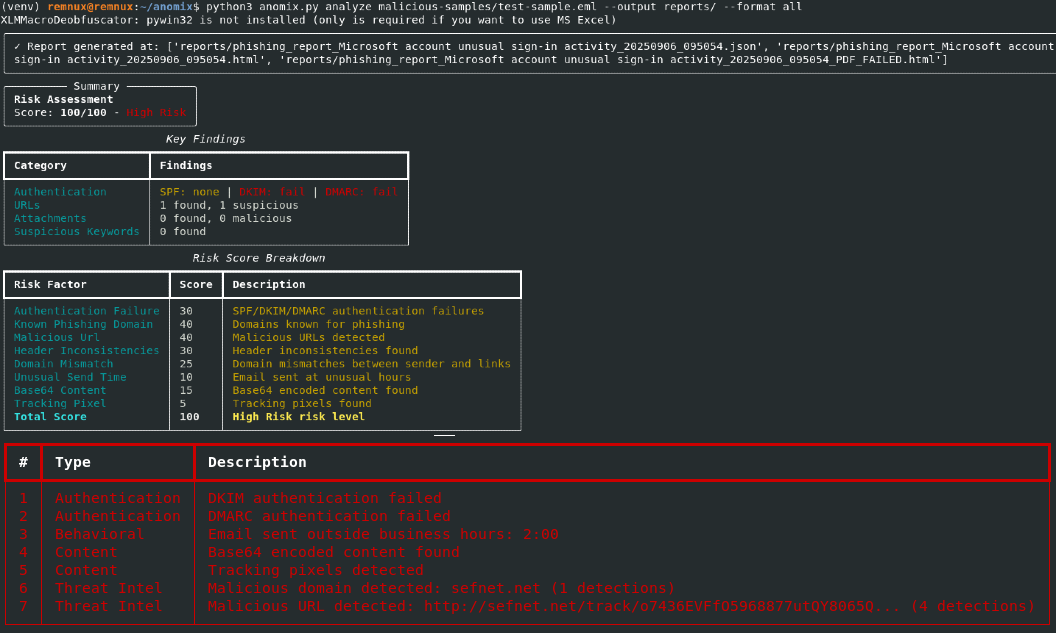
The tool made several findings, shown in the following breakdown:
Risk Score Breakdown
| Risk Factor | Score | Description |
|---|---|---|
| Authentication Failure | 30 | SPF/DKIM/DMARC authentication failures |
| Known Phishing Domain | 40 | Domains known for phishing |
| Malicious URL | 40 | Malicious URLs detected |
| Header Inconsistencies | 30 | Header inconsistencies found |
| Domain Mismatch | 25 | Domain mismatches between sender and links |
| Unusual Send Time | 10 | Email sent at unusual hours |
| Base64 Content | 15 | Base64 encoded content found |
| Tracking Pixel | 5 | Tracking pixels found |
| Total Score | 100 | High Risk |
Red Flags Detected
| # | Type | Description |
|---|---|---|
| 1 | Authentication | DKIM authentication failed |
| 2 | Authentication | DMARC authentication failed |
| 3 | Behavioral | Email sent outside business hours: 2:00 |
| 4 | Content | Base64 encoded content found |
| 5 | Content | Tracking pixels detected |
| 6 | Threat Intel | Malicious domain detected: sefnet.net (1 detection) |
| 7 | Threat Intel | Malicious URL detected: http://sefnet.net/track/o7436EVFfO5968877utQY8065Q... (4 detections) |
Let's analyze the email without threat intelligence and observe the results.
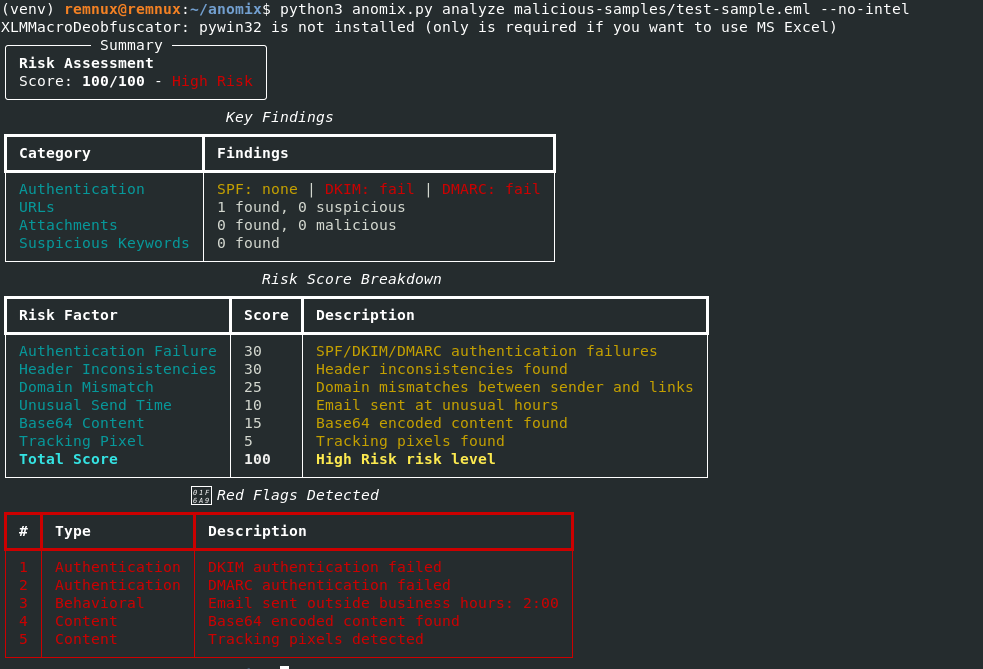
From the image above, we can see that threat intelligence analysis has been excluded. Instead, the tool simply analyzes the content of the email, compares it based on the trained model, and assigns a risk score based on its findings.
Notes:
- The risk scores assigned to each finding are fixed by default. However, they can be changed by editing the source code.
- Some malicious keywords are hardcoded into the tool. If you or your organization use similar keywords in normal email communication, you might encounter false positives.
- To reduce false positives, you can add or remove keywords in the source code to better align the tool with your environment.
⚙️ Tip: Always review the static keyword list and adjust according to your operational context before deploying the tool in a production environment.
From this, we can already see the email is malicious. Let’s go through the report in more detail.
Step 2: Email HTML Review
When we view the HTML:
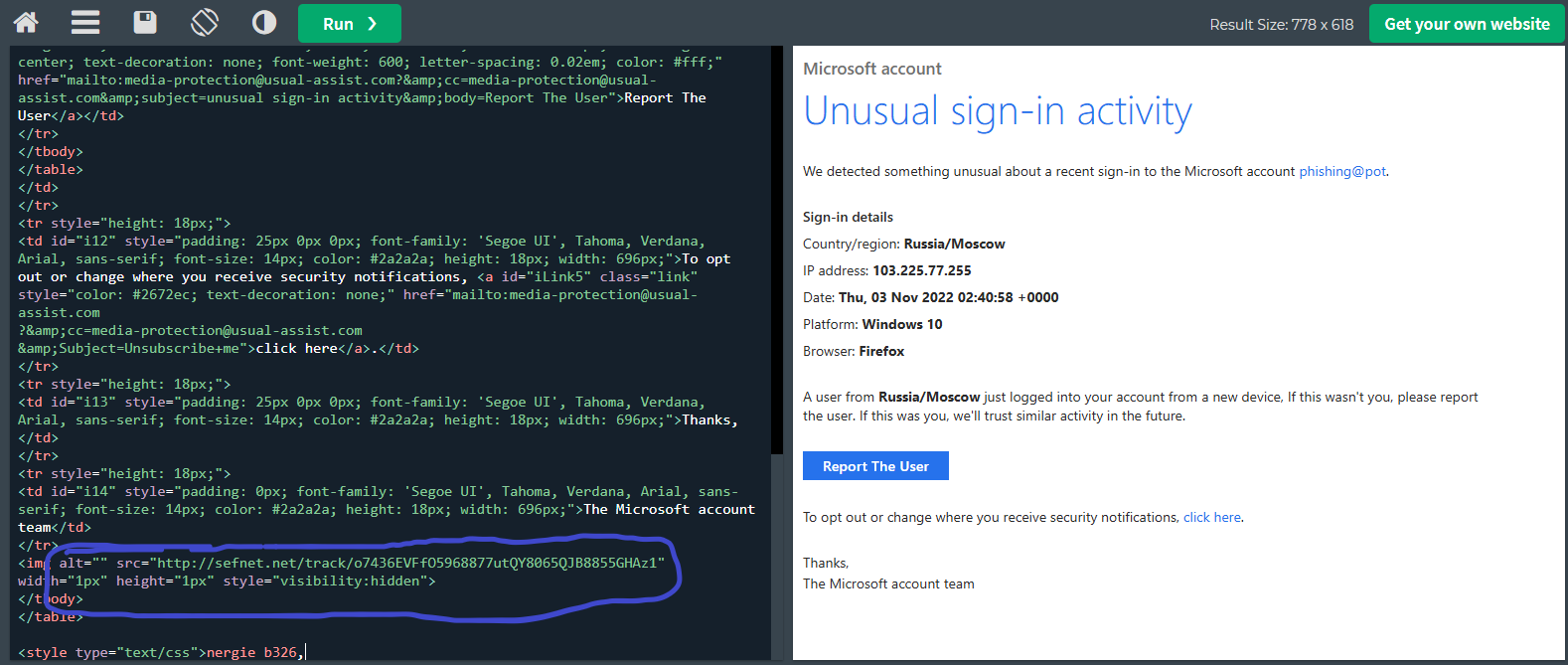
And look closer:
We see the email uses a tracking pixel linked to a malicious domain.
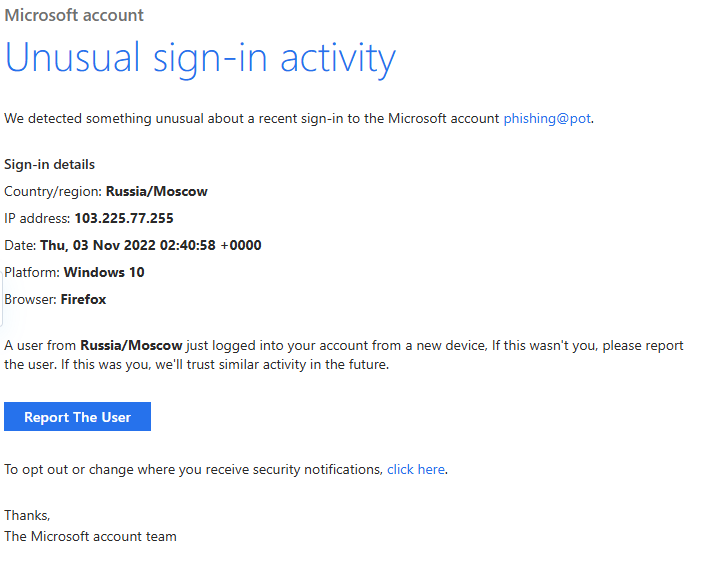
It also claims to be from Microsoft, but it is not.
Step 3: Analyzing the Headers
The full report can be found here: Microsoft unusual login report.
Headers
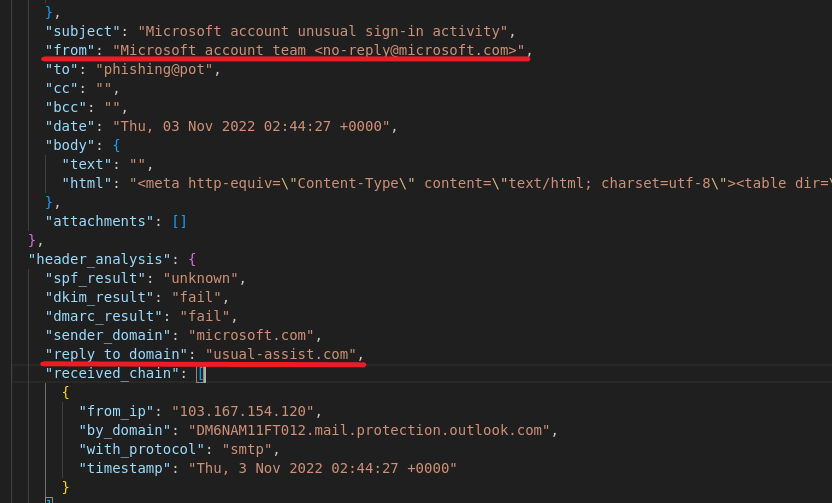
From the above, we can see:
- The email says it’s
fromMicrosoft. - But the reply-to domain is different, proving a domain mismatch.
- This usually happens when an attacker spoofs the domain.
📌 Note: The "From" field can be spoofed, but the Reply-To field is much harder to fake. Always check it carefully.
Also, the subject says “Microsoft account unusual sign in activity”, which is impersonation of Microsoft to scare the user.
Other details like IPs and routing are included in the anomix generated report.
Step 4: Authentication Results
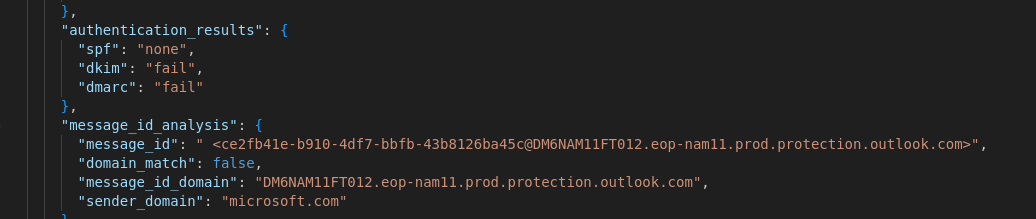
All authentication checks failed (SPF, DKIM, DMARC).
Step 5: Date & Time Check
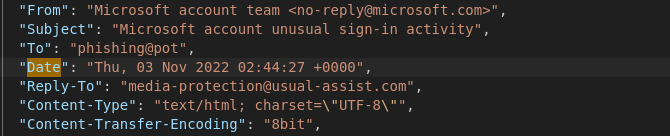
The report shows the email was sent at an unusual time (2:00 AM), supporting the suspicion.
Step 6: Threat Intelligence
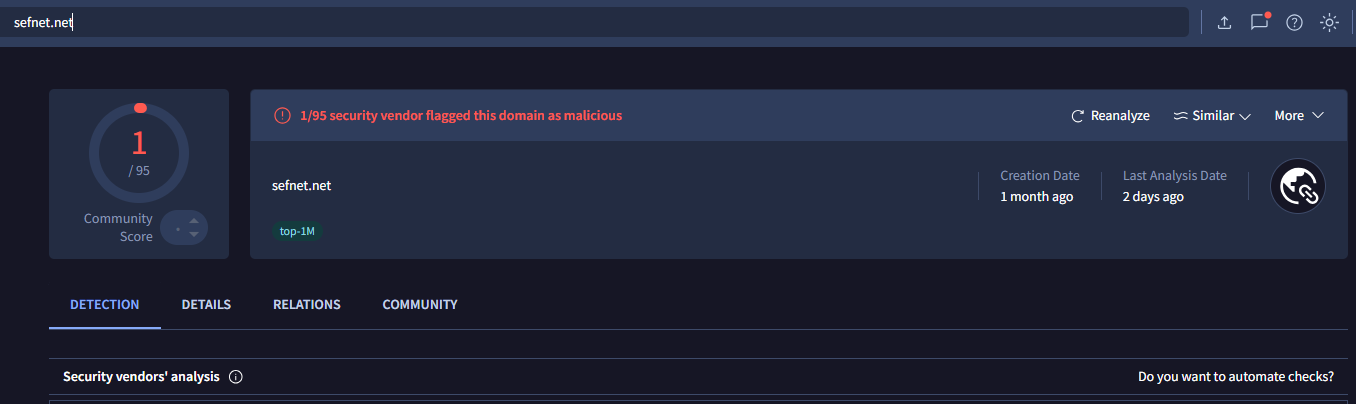
The URL found in the email is confirmed malicious on VirusTotal.
Key Takeaways
anomixextracts every detail automatically and helps analysts quickly spot malicious behavior.- The more the model is trained, the better it becomes at detecting phishing attempts.
Escalation Report (Case File)
Escalation Report: Suspected Phishing Email
- Date: November 3, 2022
- Analyst: Junior SOC Analyst
- Subject: Suspicious email with malicious domain and spoofed Microsoft branding
1. Summary
A high-confidence phishing email was detected, pretending to be a Microsoft security notification. It used a malicious tracking domain (sefnet.net) confirmed by VirusTotal.
2. Key Indicators of Compromise (IOCs)
| Type | Value | Notes |
|---|---|---|
| Sending Domain | nisihfjoz.co.uk | SPF: None, DKIM: Fail, DMARC: Fail |
| Reply-To | media-protection@usual-assist.com | Suspicious, non-Microsoft domain |
| Malicious Domain | sefnet.net | Found in HTML <img>, flagged by VT |
| Source IP | 103.167.154.120 | Originating mail server |
| Subject | Microsoft account unusual sign-in... | Impersonation of Microsoft |
3. Analysis
- Spoofing: All email security checks failed (SPF, DKIM, DMARC).
- Social Engineering: Email mimicked Microsoft branding to create urgency.
- Malicious Component: Hidden 1x1 pixel image linked to malicious domain.
- Behavioral: Sent outside normal business hours.
4. Recommendations
- Block the IOCs (
nisihfjoz.co.uk,usual-assist.com,sefnet.net,103.167.154.120). - Warn users about the phishing campaign.
- Investigate if any internal hosts communicated with these domains.
- Escalate to Threat Intel / Incident Response teams for further review.